According to Wikipedia, "A heap overflow is a type of buffer overflow that occurs in the heap data area.". Before we continue with the details of this type of vulnerability, we have to understand how computer memory is structured for any given program. Also we need to keep in mind the following concepts:
- 1 Byte = 8 Bits.
- sizeof(char) = 1 byte.
- sizeof(int) = 4 bytes.
- If we locate an integer at address 0x00000000, the next integer will be at 0x00000004.
- If we locate a character at address 0x00000000, the next character will be at 0x00000001.
Also you must have basic knowledge about how the memory of a program looks like.
How to Exploit The Heap?
One possible scenario is as follows, we locate two memory locations to hold two pieces of data. We try to place more data in the first located location to override the data on the second location. This seems simple. Before we try to do it in C Language, we need to look at the structure of the heap in memory.
Heap Memory Structure
The first thing to know is that heap memory is divided into chunks. One chunk can have one of two states:
An allocated chunk contain the following information: Size of previous chunk (if allocated), Size of chunk (in bytes) with some bit flags and User data. A free chunk contain the following information: Size of previous chunk, Size of chunk (in bytes), Forward pointer to next chunk (FD), Back pointer to previous chunk (BK) and unused space (it can be 0).

 Heap over flow can happen when we try to fit more data in the first chunk than its size. The next code example shows a vulnerable code in C.
The next picture shows how the heap will look like when buffer overflow happen.
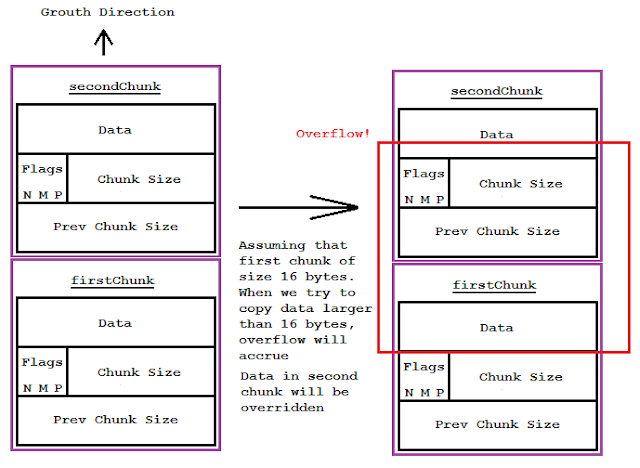
This is the basics behind buffer heap overflow.
An allocated chunk contain the following information: Size of previous chunk (if allocated), Size of chunk (in bytes) with some bit flags and User data. A free chunk contain the following information: Size of previous chunk, Size of chunk (in bytes), Forward pointer to next chunk (FD), Back pointer to previous chunk (BK) and unused space (it can be 0).

Exploiting the Heap
Now let's return to the scenario that we have talked about before and explain it in more details. When we locate memory in the heap, the top chunks will be the last chunks that was located.
int main(int c, char ** argv) {
//buffer for 2 chars
char *buf = (char *)malloc(sizeof(char)*2);
//the buffer can have only 2 bytes
//argv[0] will be the name of file
//it can be more than 2 characters -> overflow
strcpy(buf, argv[0]);
}
//buffer for 2 chars
char *buf = (char *)malloc(sizeof(char)*2);
//the buffer can have only 2 bytes
//argv[0] will be the name of file
//it can be more than 2 characters -> overflow
strcpy(buf, argv[0]);
}
The next picture shows how the heap will look like when buffer overflow happen.

This is the basics behind buffer heap overflow.

